Tuesday, March 06, 2007

Alpha 1.32 Released

Several new features have been added, one of them quite significant.

Change Mobile UserName
From its inception, I always envisioned Pocket Pollster being used in the field with one mobile device per user. But the new client wanted to have a smaller pool of devices and let anyone take any device at any time. This meant there had to be a way to allow the mobile user to input their name on-the-fly.

The solution is the introduction of a special screen that now appears at the very beginning of a poll. It displays the current user's name but provides a simple way to change it, if required. Here's an example of this screen:

The presence of this mobile screen is controlled in the Pollster Privileges section on the Settings screen of the Desktop software:

If checked then the screen will appear on the mobile device; if not, it won't. The poll's creator is thus given the maximum amount of flexibility to control whether this option should be provided.


Data Transfer Options
In the past the Options screen on the Desktop consisted of just a few items that all resided in one small dialog box. But the addition of some new items necessitated an expanded version. There's now a Data Transfer page that looks like this:

The initial two items added to this screen are these:
  • Unattended Sync - Sometimes Pocket Pollster is setup on a desktop computer and then isn't used for a period of time. Unchecking this box will prevent the Data Transfer dialog box from automatically appearing every time a mobile device is synched. If, however, the Pocket Pollster desktop software is running then the dialog box will appear.
  • Audible Feedback - When the Data Transfer dialog box appears a distinct series of tones are heard as well. Unchecking this box will turn off these sounds. It should be noted however that the sounds emanating from ActiveSync are unaffected by this setting.

Testing in the Real World

Even before Pocket Pollster is officially available for sale, an engineering client wanted to try it out. So they purchased 4 new HP iPaqs, 4 Rhinoskin cases, and 4 x 1GB memory cards.

The software installed flawlessly, each unit taking less than 1 minute to configure. All mobile installations were done with just 1-touch, and that can even be reduced to hands free installation if so desired.

As part of our agreement, I added one major new feature to the product and a few minor ones. These I will describe in a subsequent posting.

Pocket Pollster was tested on a prominent construction project in Vancouver and then another one in the Canadian Maritimes. At such time that I'm at liberty to provide details, I will. But all reports back were very positive. In fact, the Desktop's graphical Summary screen was used to present the field testing results to top executives of the company, much akin to a PowerPoint presentation. I never envisioned the software being used in this way but there's an old adage amongst software professionals to never assume your customers will use your software in the same way you would!

Thursday, February 15, 2007

Automated Export

Ever since Alpha Version 1.2, there has been an automated export feature in Pocket Pollster. It has become apparent that the powerful nature of this feature is not fully understood by everyone.

Once activated (on the Settings screen of a poll), an associated MS Access MDB file will be updated every time new data is downloaded from a mobile device.

This MDB file can reside on the same computer where Pocket Pollster is installed or on a computer half way around the world, if one's Intranet so allows. Other software applications could then potentially (and continuously) be fed with the updated info in the MDB file.

It is envisioned that once setup in this way, the Desktop component of Pocket Pollster may seldomly ever be used again, instead just serving as the automated data collection engine for most any other software a company owns. Powerful simplicity indeed!

Tuesday, January 16, 2007

Pocket Pollster is Still Going Strong!

Some colleagues have asked me why there haven't been many blog entries on here the past few months. There are actually three reasons:
  1. I've been consumed with some consulting for a major client, which had to be attended to.
  2. I took some time off in December, including a trip to Chicago to visit some old friends. While there I met with some people who are interested in creating Chicago Digital Divide, modeled after the organization I founded, BC Digital Divide.
  3. Now that Version 1.0 of Pocket Pollster is essentially complete, I've been focusing my time on building a brand new version of the website using ASP.net. It'll be much more functional (and better looking!) than the existing one.
So all is well. In fact, I will soon have some great news to report about the first major customer of Pocket Pollster!

Wednesday, November 15, 2006

Deleting Users and Devices

From the beginning, the basic version of Pocket Pollster was not going to initially have a full-fledged User Manager. But it became apparent that the ability to remove users (and similarly devices) was going to be necessary. So this feature has been added.

After selecting Tools-Users or Tools-Devices, just select the items that you wish to be deleted and then press the button at the lower left.

Sunday, October 15, 2006

Charting Has Arrived!

The Summary Screen can now display the results of each question in 4 different ways:
  • Bar Charts
  • Line Charts
  • Pie Charts
  • Textual Summary
Each is fairly self-explanatory but there are some additional special features too:
  • Some answer formats allow the data to be summarized in a "Simple" or a "Weighted" manner.
  • The Freeform answer format, which contains purely textual data, has its own way of summarizing the responses.
  • There's also a "No Chart" option. This is for those circumstances when none of the summary methods adequately displays the collected data; rare, but possible.
The particular chart settings you choose for each question will be remembered when you reopen the poll again, thus allowing you to tailor each poll precisely the way you want.

These new features are contained in Alpha Version 1.3. If you don't yet have access to it then please sign up for our Alpha Testing program.

Thursday, September 28, 2006

Intel's Vision for Future Mobile Computers

Here's an interesting article about what's coming down the pipe from Intel in terms of "Ultra Mobile PCs". Imagine a device the size of a Pocket PC but with the same power as a modern desktop computer. Pretty amazing!

Sunday, September 17, 2006

Export: MS Access File Format Now Selectable

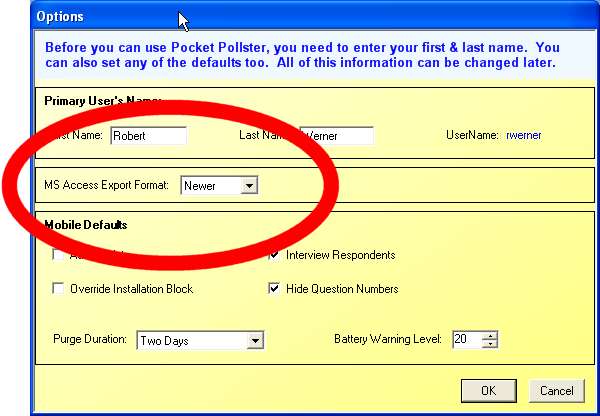
A while ago one of the Alpha Testers reported that his company still uses MS Access 97. Unfortunately Pocket Pollster has only been able to export in what is known as the "Jet 4X" format. I just received some new information from Microsoft that showed how the format could be changed to the older version, "Jet 3X". So now in the latest version you can go into Tools -> Options and set whichever version works best for your organization.

Wednesday, September 13, 2006

Seeking Feedback on Target Markets & Uses

With Pocket Pollster Version 1.0 nearing completion it's now time to replace the current, temporary website with a new one that'll be more focused on selling & supporting the product.

From the customer's point of view, a huge advantage of the software is its versatility. There are no specific limitations on how it can be used. But this does pose a dilemma from a marketing point of view. As any marketing expert will tell you, in the beginning, trying to use a "shotgun" approach and going after every possible customer at once is a poor idea. So instead I've been advised to initially pick 3 target markets and focus exclusively on them (the so-called "rifle approach").

To this end I am contemplating the following target markets:
  1. Market research firms

    1. On the street interviews
    2. In stores
    3. At tradeshows

  2. Political polling (polling firms & political parties)

    1. Exit polls
    2. House to house canvassing

  3. Industrial companies

    1. Safety inspections
    2. Quality assurance surveys
    3. HR surveys
    4. Production/Process stats
If you have any suggestions about the choice of target markets or can offer suggestions for more sub-items, then please do leave a comment here!

Alpha 1.23 Now Available

Alpha Version 1.23 is now available. It includes the recent features just mentioned, plus fixes a number of small issues that have been detected in testing.

If you would like to be part of our testing program then please go here and send us an e-mail with the pertinent info.

Copy & Duplicate Questions & Answers

Pocket Pollster now has the ability to duplicate existing Questions and Answers. There are two ways you can do this. The first is the most flexible and involves Drag & Drop. When you start dragging a Question Button or an Answer Panel then hold down the "Ctrl" key and you'll see a little plus sign appear beside the cursor. Keep this key pressed when you let go of the mouse button and the item will be copied.

Another way to copy a Question or an Answer is to just press the appropriate "Duplicate" button. These function in exactly the same way as "Duplicate Slide" works in PowerPoint: The duplicate item will be placed directly below the original.

This new functionality should help speed up poll creation & modification.

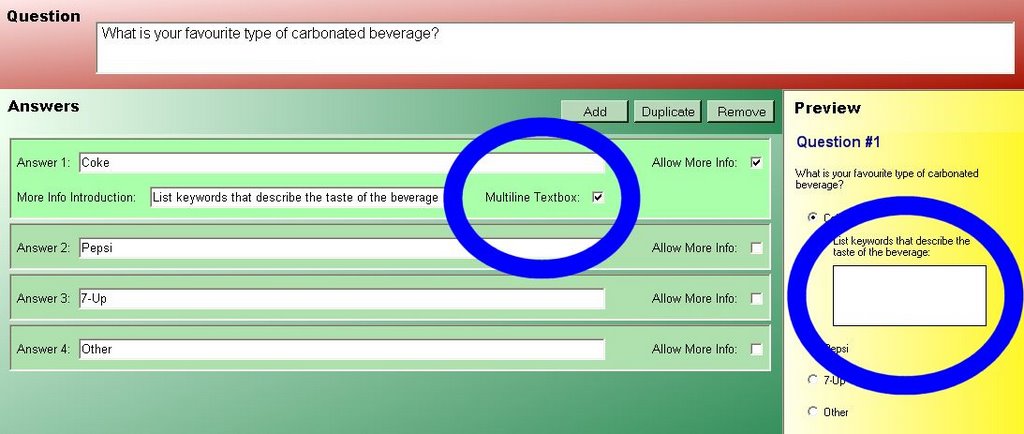
Multiline More Info Textboxes

One of the best things about the ongoing Alpha Tester program is the excellent feedback I receive from people all over the world. Last week two suggestions came in from Joe D. in Cincinnati, Ohio. One of them involved the "More Info" textbox. "More Info" is a feature similar in nature to the extra space provided for a person to add more detail on a paper form. The difference is that it can be added to any answer, not just the last one. In certain circumstances, Joe wanted to use this textbox to add multiple entries.

So now, when you choose "Allow More Info" for an answer, you'll be able to specify whether you want the pollsters to have a 1-line or multiple-line textbox.

Wednesday, September 06, 2006

Pollster Privileges

Pocket Pollster is considered a "horizontal application" in that it can be used in a multitude of industries and has not just one specific niche. But there are subtle differences in the way every organization collects data. To satisfy these many needs, a number of different settings have been planned from the outset. This includes several "Pollster Privileges". These are settings that are set by the poll creator on the Desktop but only come into effect when the poll is used on a mobile device.

On the Settings page of every poll you'll see the following. Please focus in on the third section:

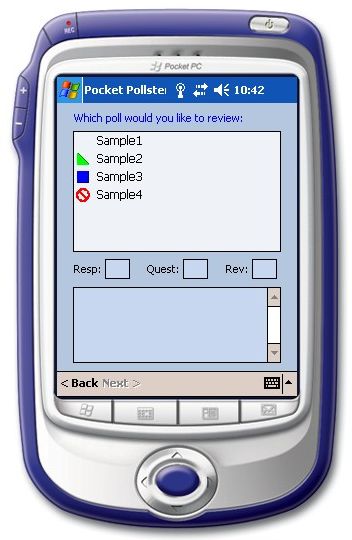
If the first one, Review Data, is unchecked then the pollster will not be able to review the data they’ve collected. This is useful in those circumstances when reducing the bias of the pollsters is of extreme importance. When selecting a file for review, those with this setting unchecked will have the international "Not Allowed" symbol beside them, as shown beside "Sample 4" here:

Can Abort Records – A pollster can press Finish to skip through a given set of questions. This is useful in those circumstances when the respondent leaves or for some other reason the current set of questions can’t be completed. If this item is checked then the pollster will be asked whether they want to abort the record (not save it at all). If the item is unchecked then every record will be saved, even partially completed ones. This is useful in those circumstances when auditing of a poll may be carried out to precisely verify what happened during the polling session. To use an analogy, if this setting is checked then it's like using a pencil on a paper form; if it's unchecked then it's like using a pen.

Friday, September 01, 2006

Internal vs. External Polling

Two of the key features of Pocket Pollster are ease-of-use and flexibility. Further to the previous posting, work is now underway to expand the flexibility of the software so that it can be used as readily for "internal polling" (within an organization) as it already is for "external polling".

With the existing software, the fields on the Respondent info screen are all of the "freeform" variety. The pollster is prompted to fill in the following fields for each new respondent they interview:
  • First Name
  • Last Name
  • Address
  • City
  • State/Province
  • Postal/Zip Code
  • Area Code
  • Telephone Number
  • E-mail Address
  • Sex
  • Age
This seems to be an appropriate set of general purpose contact fields for external polling.

But when surveys are conducted internally, it's clear that another set of respondent data is needed. To this end, I'm looking for feedback about what crucial set of fields would be needed for internal polling - that being those polls where all or most of the possible respondents are known ahead of time. Here's a preliminary list for consideration:
  • First Name
  • Last Name
  • Company
  • Department
  • Employee ID
  • Phone number
  • E-mail
Remember that the whole purpose of such respondent info is to uniquely identify the subsequent set of polling questions with each respondent. And unlike external polling, internal pollsters will have the added benefit of being able to quickly pick a given person by identifying them from a list, something that just isn't possible when you're doing random polling of people you've never met before.

Wednesday, August 23, 2006

A New Idea

One of the Alpha testers called me today and offered several interesting ideas that definitely will be added to Pocket Pollster in the future. One of them involved adding a setting that would determine whether Respondent info is added like it is currently - namely freeform - or instead picked from an existing list.

This second method would likely be used by companies where all/most of the respondents were existing employees. Since their names are already known, there's no point in adding them anew every time.

There are many ways such a contact list could be added and maintained. But I got to thinking that the Pocket Outlook Contact List might perfectly suffice for this purpose. So rather than building another list, Pocket Pollster could just tap into the Outlook database.

I'd like to get some feedback from corporate users if this approach would suffice for them. I'm particularly interested in the answers to these questions:
  1. Does your Desktop/Laptop Outlook contain all of the employees in your company?
  2. If so, then approximately how many entries would this be?
  3. Is this list of employees automatically copied over to your Pocket PC?

Tuesday, August 08, 2006

Alpha 1.2 Released

Thanks to excellent feedback from several Alpha Testers, some significant new features have been added. Here's an overview of them:

Export
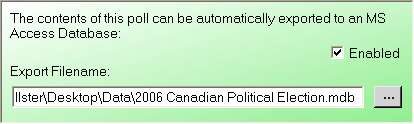
An export engine has been added to the software. This first generation of export can save the data in the common MS Access MDB file format. It can be used manually by just clicking File -> Export. Auto-Export can also be setup by going to the Settings page of a poll and clicking on the "Enabled" checkbox in the green panel:

Since every poll is different, the big challenge with Export was to make it universally functional for everyone. To this end, it creates these 3 tables every time: Questions, Choices, and Respondents. Their internal structure never changes. It then creates one table for each question, with the name "Question_#", where # = 1, 2, 3, ... The structure of each of these Question tables varies depending on what Choices exist for it.

Once Auto-Export is turned on, whenever new data is brought into the poll, it is automatically exported to the associated MS Access database file. This means that once you’ve defined and published one or more templates, you may not find any need to go back into the Pocket Pollster software for some time because all of the data will be fully available in the external database file, which could then be accessed by other software applications too. Thus in some organizations Pocket Pollster will serve as a highly customizable (and completely seamless!) front-end mobile data collection tool.

Locking
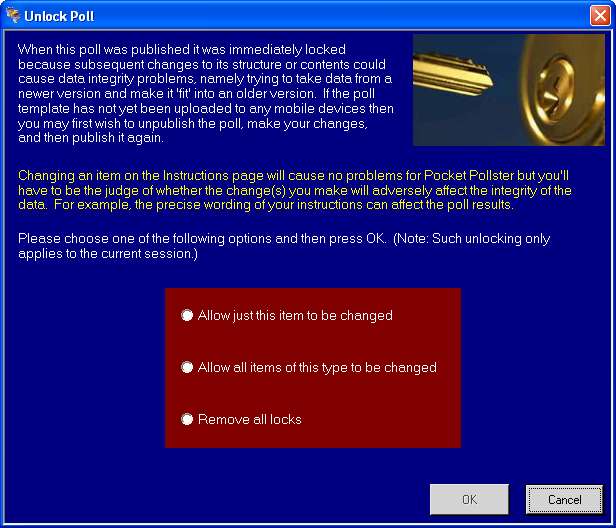
As soon as you publish your poll template, it is “locked”. This is because subsequent changes to its structure or contents could cause data integrity problems. Imagine the situation where a poll template is published, distributed to several Pocket PCs, and data is collected using that template. If the original template is then altered, the incoming data may no longer “fit” into the changed version. It is the age-old problem of trying to fit a square peg into a round hole.

If you’re doing scientific polling, then it’s advisable that no changes whatsoever be made and instead a new poll template be issued. If you’re collecting data for an internal business process then there’s likely no harm in correcting a spelling mistake or improving the Instructions, etc.

In any case, once you’ve published your poll, if you then try to alter anything on the Instructions or Questions & Answers pages, a dialog box like this one will appear:

You are given several Unlock options or you can press Cancel to abort the change.

Unpublish
It became apparent that there are several circumstances under which one might want to "Unpublish" a poll. This feature can be accessed from the File menu. It simply removes the associated file in the “Templates” folder.

Abort Record During Data Entry
The mobile software has always allowed the pollster to instantly jump to the end of the questions. This was useful in those circumstances when the polling questions had to be stopped midstream - ex. Maybe the respondent didn't want to participate anymore. But the data record itself was still saved for historical purposes.

The option has now been given the pollster to decide where to keep the partial record or not save it at all. Note: If users demand it, the poll creator could be given the ability to override this pollster option, thus keeping all data, even when it is not complete.


If you're not yet a Pocket Pollster Alpha Tester and would like to try out the software then please contact us.

Friday, July 14, 2006

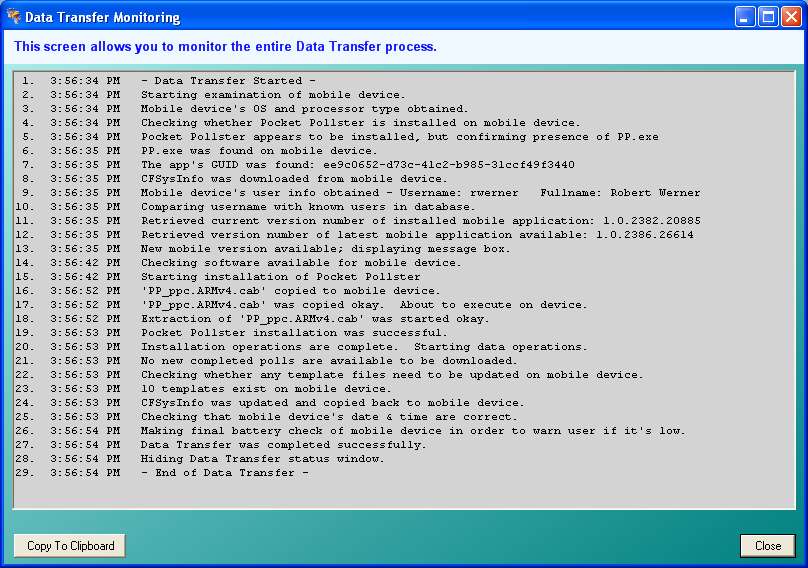
Data Transfer Monitoring Tool Added

A few Alpha testers are still experiencing problems with the data transfer process. So to help resolve their problems, I've added a Monitoring screen to the Desktop application. It can be accessed from the Tools menu.


This feature was added to the July 14th version of the application aka Version Alpha 1.15.

Monday, July 10, 2006

Improved Response Time on Mobile Devices

When you are selecting a poll to start, resume, or review, the mobile application has historically just queried the file to get such information as the summary, the number of questions, and the number of responses. On a newer mobile device, this poses no problem whatsoever and occurs almost instantaneously. However, on older units it actually takes quite a few seconds to retrieve this info. On some really old units, the delay was completely unacceptable.

So I introduced an indexing scheme that involves new code in each of the Desktop, Data Transfer, and Mobile modules. The system now caches all of the necessary summary info of the Template files, which are the ones used to start new polls. The speed improvements on the mobile device are dramatic.

Monday, July 03, 2006

Data Transfer Video

A few testers have had a "less than perfect experience" with the Data Transfer component of Pocket Pollster. The fact is that Data Transfer is supposed to be absolutely simple and straightforward, with almost always no interaction required by the user. Just sync your device, as you normally would with ActiveSync and then everything after that is taken care of automatically.

I thought it would be helpful to provide a short video of what should happen in a typical Data Transfer operation. To view this 7.04MB video, please click here.

The speed of the entire procedure is most dependent on the speed of the mobile device. In this video the device was an older Pocket PC 2002 model, quite slow compared to today's units.

Friday, June 30, 2006

FAQs 2 - Pocket Pollster Setup Files

If I use Add/Remove Programs to uninstall Pocket Pollster, will my Data files be removed too?
No. All of the files & folders in your "Data" folder will remain intact. So, in fact, will a personal preferences file called "SysInfo.xml". So when you install a newer version, all of your files & settings will be exactly the same as before.

Do I have to first uninstall the old version before I can install the new one?
You did before but beginning with Alpha Version 1.1, you no longer do.

What has to be installed on my computer before I can setup Pocket Pollster?
Just 3 things:
  • A working version of Windows, with the latest service packs installed.
  • The dotNet Framework, either Version 1.1 or 2.0 or both installed.
  • A working version of ActiveSync 3.8 or 4.1. Newer versions will likely work too, though have not been tested yet. It's of critical importance that the synchronization with ActiveSync is working properly before Pocket Pollster is used, since the latter does not have the ability to correct any problems with the former.